“We can deliver by Friday if the other assignment is removed” contains a condition. “We are working toward Friday” leaves that condition behind. A colleague receiving the rewrite could arrange their own work around a commitment you never intended to make.
At work, a generated answer rarely stops with the person who requested it. It becomes an email, a sales proposal, a forecast, or a report somebody else will use. That person may see none of the files, instructions, or conversation that shaped the draft. Your responsibility is to check what you are asking them to believe and what you are committing them to do.
This chapter gives you a routine for that work: choose the evidence, separate assessment from persuasion, check the consequential claims, and carry corrections to the people who received them. Begin with one recurring deliverable. A routine people can actually complete is more useful than a policy telling everyone to be careful.
For a substantial document, the deliverable is only one file in the project. Think in terms of a directory containing the evidence, analysis, output, and prompts. Developers already work with source files, instructions, and tests beside the software they produce. The same approach can help someone preparing a proposal, a plan, or a presentation. You can use it with consumer tools without writing the code yourself.
Start with a small, dated source collection
Create a folder for the work before asking an assistant to write the document. This means an actual folder on your computer or in an approved shared file system, containing the records that will support the work. A chat containing your recollection of the evidence is a different starting point.
For a project proposal, gather the request, budget, estimates, requirements, correspondence, and relevant test results. For a garage renovation, gather measurements, photographs, quotations, and information about restrictions. Include material that could make the plan impractical. The purpose of the collection is to establish what you can support, including what you would rather not discover.
Keep evidence, analysis, and output separate
Use evidence for original records, analysis for investigations and calculations, and output for drafts and the final document. Add a prompts folder for the instructions used at each step, a project-instructions.md file for the working rules and responsibilities, and a desired-outcome.md file describing what you want to accomplish. The extension identifies a plain-text Markdown file; an ordinary text document can serve the same purpose.
For example, a project directory could look like this:
project-proposal/
  project-instructions.md
  desired-outcome.md
  evidence/
    source-manifest.md
    Exhibit-A-boss-email.eml
    Exhibit-B-project-budget.xlsx
    Exhibit-C-supplier-estimate.docx
  analysis/
    01-input-inventory.md
    02-cost-and-risk-analysis.md
    03-funder-questions.md
    04-checked-findings.md
  output/
    proposal-draft.docx
  prompts/
    01-assess-evidence.md
    02-check-calculations.md
    03-devils-advocate.md
The filenames show where each result belongs; they do not indicate that the work has already been completed. Create the empty folders first. Save analysis files as those steps are performed, and retain dated versions when a finding changes.
Name each exhibit so you can recognize it without reopening it. Record the filename, sender or author, source date, version, and location in the source manifest. Identify attachments and their relationship to an email. If the subject line says “approved” but the message approves only part of the budget, record that distinction. A filename helps you find a record; it does not establish what the record proves.
Keep the originals intact. When a source changes, save a new dated exhibit instead of overwriting the earlier version. A cleaned spreadsheet, converted email, extracted transcript, or model-generated summary is a derivative: save it in analysis and identify the original it came from. Preserve the original spreadsheet's formulas and sheets, even if the assistant needs a separate export to examine particular values. If a source cannot be read in its original format, record the conversion and what may have been lost.
For example, preserve the original email file locally even if the chat requires a text or PDF copy. Include the sender, date, and exhibit identifier in the readable copy, and supply necessary attachments separately. Check that your tool can analyze the spreadsheet; if you provide an export instead, inspect it against the original before relying on it.
Tell the tool which locations it may read and where it may put new files. Where supported, enforce read-only access to evidence and limit writes to the working folders. The instruction “do not change the evidence” is still useful, but it is not a permission boundary. Folder names alone do not prevent an assistant from changing their contents.1
Use the organization's approved workspace. Check the selected files, project instructions, connected services, and memory before supplying customer material. Chapter 8 explains project context controls. A new project name or an evidence folder does not establish isolation from other clients' files or conversations.
The tool also needs an actual route to the files. In a chat based on attachments, upload the selected exhibits and manifest; naming a folder in a prompt does not grant access to your computer. In a supported local-folder mode, connect only the folders needed for this work and check the granted access. ChatGPT distinguishes uploaded project sources from local projects, while Claude's documented desktop Cowork workflow can use folders you explicitly connect. Available capabilities and controls differ by product.1
Since October 6, 2026, new Pro and Max Cowork tasks run in the cloud; the setting that kept tasks off the computer was removed. Connected local folders still require the desktop app to be open, and tasks started before that date remain local. Anthropic has also begun combining Cowork and chat into one experience for Pro and Max, so the separate Cowork selector may not appear in your interface; Team and Enterprise plans can keep the two modes separate. Check where the task runs as well as which files it can reach.2
State the desired outcome without prescribing the finding
Write desired-outcome.md before drafting. Describe the audience, the decision, and the requirements: “Prepare a proposal that lets the director decide whether this project merits funding.” You can also record that you hope the director approves it. Keep that preference separate from evidence that approval is warranted.
For the garage, the outcome might be a plan for usable workspace within a stated budget. That does not establish that your preferred renovation is affordable. The analysis still needs to determine the likely costs, constraints, and alternatives. It may show that you need a smaller project or a different sequence of work.
Define the questions before requesting a persuasive document. How much will this cost? Which figures are estimates? What assumptions determine the schedule? What problems have occurred before? What would make the proposal fail? A goal gives the work direction; the answers determine which version of that goal the evidence supports.
For the first assessment, supply the evidence, audience, and decision criteria without the request to win approval. In an attachment-based chat, hold back the file containing that preference until the analysis has been checked. In a local tool, restrict read access to it where supported; making it read-only would still expose its contents. Keep it out of shared project sources that the analysis might retrieve automatically. The assistant needs to understand the decision being assessed; it does not need an instruction to deliver the verdict you hope for.
Analyze the evidence before drafting the proposal
Begin with an inventory. Give this instruction in a tool with the approved files available, or attach the files to the chat:
Inspect the supplied exhibits and source manifest. List the files you could actually read, their dates and versions, and any missing attachments, unreadable sheets, or extraction problems. Identify conflicting figures and requirements that appear only in a summary. Do not change the evidence or draft the proposal. Put the inventory in analysis/01-input-inventory.md, or return its contents for me to save if you cannot write files.
Compare the inventory with your directory. Having access to a file is not proof that every sheet, attachment, or page was inspected. Check important locations yourself. If the assistant cannot read a required record, resolve that gap before asking it to draw conclusions from the collection.
Then give it a focused analysis assignment:
Using the identified exhibits, assess costs, timing, constraints, and risks against the stated requirements. Cite the exhibit and precise location for each material finding. Separate documented facts, calculations, estimates, assumptions, and unresolved questions. Identify evidence that supports the plan and evidence that could change or defeat it. Assess the proposal without assuming a preferred outcome. Do not write a sales case. Save the analysis in analysis/02-cost-and-risk-analysis.md, or return it for me to save.
For a complex project, split that assignment further: one pass for costs, another for dependencies, another for previous failures. Give each task the sources and question it needs. Ask for calculations to be performed with suitable tools, with inputs and results recorded. A written formula or a saved analysis file does not establish that a calculation was executed.
Next examine the proposal from the recipient's perspective:
Review the evidence as someone deciding whether to fund this project. What questions must be answered before approving, declining, or requesting changes? Identify the relevant exhibit, missing information, and why each question matters. Assess feasible alternatives using the same criteria. Do not assume the answer should be approval, and do not invent objections to sound independent. Save the questions in analysis/03-funder-questions.md, or return them for me to save.
Funding and implementation raise different questions. A person funding the work needs to know what the money buys and what could prevent delivery. Someone implementing it needs to know the dependencies and obligations. Both assessments should use the same evidence.
Put a human checkpoint between analysis and output
Open the intermediate results before requesting the final document. Follow material claims back to the exhibits. Reproduce important arithmetic. Check whether assumptions have been labeled, whether contrary evidence was considered, and whether the analysis omitted something that could change the decision. Correct the analysis and save the checked findings in analysis/04-checked-findings.md, recording who checked them, when, which source versions were used, and which questions remain unresolved.
This is where breaking up the work helps. “The project is affordable” is easier to examine when the preceding calculation lists the costs and exclusions. A missing installation charge can be caught in that calculation before it becomes a confident claim in a thirty-page proposal. A risk list gives you a place to look for silent omission, although an apparently complete list still cannot prove that nothing was overlooked.
After that checkpoint, request the document:
Draft the proposal for the stated audience using the checked findings and their cited exhibits. Preserve material conditions, uncertainties, contrary evidence, and unresolved costs. Do not describe an assumption as established or imply approval has been granted. Flag any additional claim that needs verification. Save the draft in output/proposal-draft.docx if supported, or provide a draft I can save. Do not modify the evidence or send the document.
If the assistant finds a new issue while drafting, return it to the analysis for checking. It should not quietly resolve an inconvenient question by making the wording more confident. The following sections explain how to assess the recommendation, verify calculations and commitments, and review the finished draft with another model.
This takes more work than asking for an impressive proposal in one message. It also gives you smaller results to inspect: an input inventory, a cost calculation, a set of questions, and a draft based on checked findings. A focused assignment makes the scope and limits of each step clearer. The assistant can perform substantial work, while you retain the checkpoints where evidence determines the recommendation.
The companion's evidence-workspace.md guide and 14-evidence-workflow.md prompts reproduce the folder arrangement and staged instructions. They are a practical way to organize scrutiny, not a guarantee that the model will detect every error or resist every preference.
Assess the proposal before selling it
A request to make a proposal persuasive is a writing assignment. It does not establish that the proposal deserves approval. Assess the evidence first, against requirements agreed before the pitch. Compare realistic alternatives, including delaying the decision or doing nothing where those are available choices.
For a purchase, those requirements might include cost, capacity, compatibility, and the time required to put it into use. State them separately from the sponsor's enthusiasm. Then ask:
Assess the proposal against Exhibits A–D and the stated requirements. For each consequential claim, give the source identifier and location, the finding, and any uncertainty. Identify supported, contradicted, and unresolved claims. Compare the feasible alternatives using the same criteria. Do not treat the sponsor's preference as evidence. Do not invent objections to appear critical.
The last instruction matters. An assistant can manufacture criticism as well as praise. You want a reason to change a decision when the evidence warrants it, rather than a performance of independence. Open the cited records and check the claims that could alter the recommendation.
Where practical, have reviewers write an initial assessment before seeing the sponsor's recommendation or the assistant's conclusion. Later, ask what new evidence changed their view. This can make a discussion less dependent on whoever spoke first or most confidently.
Zana Buçinca and colleagues explored this problem in “To Trust or to Think: Cognitive Forcing Functions Can Reduce Overreliance on AI in AI-assisted Decision-making” (2021). In an experiment with 199 participants, designs requiring more thought reduced acceptance of incorrect AI suggestions compared with simpler explanatory interfaces. The most effective designs received worse subjective ratings, and benefits differed across participants. The study does not validate this chapter's workplace routine; it does show why ease of use and error detection deserve separate measures.1
Once the assessment is complete, draft the pitch from its checked findings. Preserve qualifications that could change the buyer's decision. A shorter report can still say that the proposed saving excludes installation costs or depends on a supplier meeting a deadline.
Devil's advocate
Before sending a substantial piece of writing, give it a second assessment. That might be an important email, a long proposal, an executive summary of a seventy-eight-page report, or a two-hundred-and-fifty-page book. The effort should follow the consequences and complexity. A routine two-sentence reply usually needs you to write it, read it, and send it.
A useful devil's advocate review asks whether the work holds up. It checks facts, tests assumptions, and looks for gaps that would matter to the reader. It should help a sound document succeed and show you what a weak one needs. Asking a model to find fault with everything simply gives it another performance to deliver.
Start a separate review
Finish a version worth checking, then save it with a date or version number. Include the source collection, intended audience, purpose, and requirements. The reviewer needs the actual document, not a summary of why you think it is good. Keep the drafting conversation and its praise out of the review unless a particular decision recorded there is needed evidence.
Move to a different capable model, preferably from a different provider when the material is approved for that service. If you drafted with an OpenAI model, Claude is one possible reviewer; if you drafted with Claude, an OpenAI model is another. A different provider helps avoid continuing the same personal conversation and gives you another model's assessment. It does not establish that their errors are independent.
Use the context boundaries from Chapter 8. Start a fresh review context, inspect standing instructions, and supply the approved documents deliberately. At work, use a second service only if your organization permits it. A new chat named “Independent reviewer” is still subject to whatever memory and instructions its product uses.
Choose the strongest suitable model and the highest supported reasoning setting when the task warrants the time and usage. A manuscript with hundreds of factual claims deserves more effort than a routine email. Record what you selected; do not assume every product's “maximum” means the same thing.
Set the review up in ChatGPT or Claude
These directions were checked against official documentation on October 3, 2026, and rechecked against the same pages on October 27, 2026. Availability depends on your plan, client, and workspace.
Choose a project-only Chat assessment when its available tools suffice. ChatGPT Work is unavailable in a project using project-only memory. For the Work procedure below, use a separate task and inspect its environment, attached folders, plugins, sources, and standing context; a new task is not a promise of memory-free input.3
For ChatGPT Work:
1. Start a new task in Work. Open the model and reasoning control beneath the composer, then Advanced where shown. 2. Select an available model, such as GPT 6.1 Sol or Astra. Choose Max or Ultra if your model and account support it. In the desktop app, an available Ultra option can be exposed through Settings → Configuration → Ultra in model picker slider. 3. Attach the versioned document and relevant sources. State that this is a review of the complete document. 4. Ask explicitly for primary-source research and a verification record. On the web, + → Deep research, where available, is another way to set up the investigation; the desktop route is through the Deep research plugin.11
GPT 6.1 Sol is documented for Work and Codex, rather than ordinary Chat. Max gives the selected model more time on a task; Ultra can delegate parts of the work to subagents. Those parts still need a combined assessment of the entire document.2
For Claude:
1. Start a fresh review chat or a dedicated review project with the appropriate context controls. 2. Click the model name beside the send button. Select Claude Fable 5.1 or Claude Opus 5.5, where available; use More models if needed. 3. In the same menu, open Effort and select Max where available. Thinking is already on for these models. Max effort is a setting, distinct from a Max subscription; model access and included usage depend on your plan. 4. Use + → Add files or photos → select file → Open to upload the document and source files. Ask explicitly for web research to verify its factual claims, and inspect the cited originals. In the older interface, web search can also be enabled through + → Web search.111
A successfully uploaded file is not proof of a complete reading. File limits, text extraction, and context limits still matter. In Claude's documented handling, PDFs of 101–1,000 pages receive text analysis rather than visual analysis; use the original PDF to inspect charts and layout yourself, and supply important figures separately when needed. A project may retrieve selected portions of its files rather than place the entire collection into a request.2
For GLM-5.3 through OpenRouter, the documented reasoning effort supports max, which is also the default. This is a text-only model: an uploaded PDF can provide extracted prose without making its diagrams visible to the model. The companion guide includes the documented API setting; OpenRouter's interface controls may vary.1
Higher effort can give a difficult review more time and computation. It does not provide unavailable sources or guarantee factual accuracy. The result still needs evidence, coverage checks, and your judgment.
Read the whole document before delivering the verdict
For a book, ask the reviewer to read the complete manuscript before giving its overall assessment. An early chapter may raise a question that a later chapter answers. Reviewing isolated chapters and assembling their criticisms afterward can miss the argument, repeat objections, or mistake a deliberate setup for a missing explanation.
Have it inventory the files and describe which sections it could actually inspect. For a long document, keep a coverage record: version, section or page range, access or extraction problem, and checks still outstanding. Check its stated coverage against locations in the original; a model's report of its own reading is another claim to examine. Ask for findings across the work: definitions that shift, conclusions that exceed earlier evidence, repeated material, missing transitions, and summaries that misstate the chapters they summarize.
The work may need several passes or batches. That is different from issuing a final verdict on chapter one before reading chapter two. Retain the claim ledger and open questions between passes; reconcile them after the entire document has been assessed. If limits prevent a complete reading, the report should name the unreviewed material and withhold a whole-document verdict.
Keep a ledger of facts and a separate review of the argument
The full prompt is in Appendix B and 13-devils-advocate.md in the companion resources. Its guiding instruction can be stated simply:
Review this complete document as a constructive devil's advocate. Your aim is to help it succeed. Apply neutral standards: neither agree with me because I wrote it nor criticize it merely to sound independent. If you find no substantive problem in a checked area, say so, with the limits of the check.
It then separates two kinds of work. The first is verification. List factual claims, quote or locate them, and check them against original research, documents, or other appropriate primary sources. Include dates, names, quantities, quotations, and descriptions of what a study established. Classify each claim as verified, contradicted, partly supported, or unverified, with the source and reason. A claim the reviewer cannot check is unverified; that is different from false.
The second is assessment of the argument. Identify the assumptions and inferences supporting the conclusion. Does a study establish the claim being made? Is a possibility being presented as an observed result? Would the conclusion survive the strongest relevant alternative explanation? Does the executive summary preserve the qualifications in the underlying report?
A reviewer may find every quoted number accurate and still find that the conclusion does not follow. It may also find a persuasive argument with an incorrect date that needs repairing. Separate factual errors, unsupported inferences, and editorial preferences so you know what kind of revision is required.
For each important criticism, ask for the passage, the problem, supporting evidence or specific reasoning, its consequences, and a specific repair. “This feels overstated” is not enough. An actionable finding identifies which wording exceeds which result. Preserve what the document gets right, including inconvenient qualifications that should survive a shorter version.
The companion review template keeps the coverage record, fact ledger, argument findings, and unresolved checks together. A lengthy fact inventory may be delivered as a file or in several labeled batches. Do not let the output limit silently turn “all factual claims” into “a few representative claims.”
Review the review
Open the sources behind material corrections. Reproduce important calculations. Check that the reviewer used the right edition or date and that its suggested rewrite retains the meaning you intended. A second model can hallucinate a citation, misunderstand a passage, or invent a fault just as the drafting model can.
Do not settle a disagreement by counting votes. Two models can reach the same wrong conclusion, and research has measured correlated errors across models on benchmark tasks.1 The useful question is what evidence supports the finding. If the reviewer says your first-year saving is wrong, check the cost inputs and arithmetic; do not ask the drafting model to defend its earlier total until one side sounds more convincing.
Return the checked findings to the drafting model as revision instructions. Include the evidence and required change, rather than pasting an angry review and asking it to comply. Keep a record of accepted corrections, rejected suggestions and their reasons, and remaining uncertainties. Then check the revised passages and any summaries that depend on them.
If the reviewer finds no material problem, keep that finding with the version reviewed and the work it actually checked. Do not demand a quota of faults until it invents one. You want a document that can withstand examination, not a document that has pleased a second audience.
Check the calculation, not just the answer
You do not have to know Python, JavaScript, or another programming language to ask an assistant to do the arithmetic properly. Consumer tools can write code, execute it when their calculation tools are enabled, and return a spreadsheet. You can ask for that work directly. Codex and Claude Code are useful development tools, but they are not requirements for this task.11
Writing code and running it are separate steps. “Here is the script” does not mean the script was executed. Ask for the inputs, the code, the actual results, and the checks performed. If execution is unavailable, the assistant should say so instead of presenting predicted results as a completed calculation.
Ask it to do the homework
Suppose an option costs $36,000 annually and replaces $48,000 in annual spending. The apparent saving is $12,000. If implementation also costs $15,000 in the first year, that year's total is $51,000: $3,000 more than the current arrangement. A report can accurately describe a recurring saving and still mislead the reader about the first year.
Tell the assistant exactly which comparison you need:
Compare the current and proposed arrangements using the supplied budget exhibits. Identify each input's source, date, currency, units, and period. Separate recurring costs from implementation costs. Write and execute code to calculate annual recurring savings, first-year total cost, and first-year savings or additional cost. Show the code, actual results, and checks you ran. Flag missing costs rather than inventing values. Save the script and results in analysis, or return them for me to save. Do not draft the proposal yet.
For these illustrative figures, a small Python calculation is enough:
current_annual = 48_000
proposed_annual = 36_000
implementation = 15_000

annual_saving = current_annual - proposed_annual
first_year_cost = proposed_annual + implementation
first_year_saving = current_annual - first_year_cost

print(annual_saving, first_year_cost, first_year_saving)
The printed results should be 12,000, 51,000, and −3,000. The last number represents an additional first-year cost, not a saving. You can check this example with a calculator even if you cannot read the code. In your own project, check that the input values match the exhibits and that the comparison includes the costs that matter.
Execution adds something useful: the arithmetic is performed through an inspectable procedure rather than supplied only as prose. It does not establish that the procedure answers the right question. Code can calculate the wrong period, omit a cost, or use a mistaken input perfectly consistently. Ask for checks against known totals and simple alternative cases. For example, removing the one-time implementation cost should make first-year and recurring savings equal in this example.
Do this in ChatGPT or Claude
These product directions were checked October 3, 2026, and rechecked against the same pages on October 27, 2026. Available tools depend on the account, client, and workplace controls.
In ChatGPT on the web, select Work, attach the approved source files, and give the calculation assignment. Ask explicitly for code to be written and executed, with the results returned as files. Work's documented data-analysis workflows do not require you to set up Python. Review the reported execution and download the calculation files; a code block in the response is not the execution record.2
In Claude, open Settings → Capabilities → Code execution and file creation and enable it where your account permits. In a chat that supports the capability, upload the inputs and ask for the calculation and files. Claude's consumer file tools can run Python and create Excel workbooks with working formulas. An administrator can control availability, and some conversation modes do not support these tools.2
Neither request gives the assistant automatic access to your local project folder. Attach the relevant files or use a supported connection, as described earlier. If it returns downloadable files, save the script, inputs, and results together in analysis. Keep the source exhibits unchanged.
Ask for a spreadsheet you can inspect
If Excel is more familiar than code, ask for both:
Return an editable Excel workbook with separate inputs, calculations, and results. Put calculations in formulas rather than hard-coded totals. Label source exhibits, units, time periods, and assumptions. Include the script and execution record used to check the results. Tell me whether the workbook's formulas were evaluated, whether displayed values were supplied as cached results, and what still needs recalculation. Identify unresolved costs visibly.
Open the workbook yourself. Click the cell showing first-year cost and inspect the formula in the formula bar and the cells it references. In Excel's ribbon, Formulas → Show Formulas can display formulas across the sheet. The first-year calculation should include both recurring spending and implementation. Change a copy of the implementation input to zero and check that the comparison changes as expected. Restore the original before using the report. ChatGPT's documented spreadsheet workflows support editable workbooks; Claude also supports spreadsheets with formulas.131
A displayed value can be a cached result from the file creator. That is different from a formula being recalculated in Excel. Ask which actually occurred, and recalculate in a compatible spreadsheet application when needed. A beautiful workbook can still hide the same missing cost as a beautiful paragraph.2
This is another hurdle the answer has to clear. It gives you inputs, formulas, executed results, and simple checks to examine separately. You do not have to become the programmer, but you do have to verify that the calculation uses the right evidence and answers the question you meant to ask. The companion includes a runnable version of this cost example and a formula workbook demonstration.
Give research a specific job
The same discipline applies when a number has to be found before it can be calculated. “What do you think of this car?” leaves the assistant a great deal to infer. “Find comparable listings, record their prices and dates, and show me the data” defines work you can inspect.
ChatGPT and Claude can research current sources when web tools are available. Some configurations can also operate a permitted browser or computer. Code execution, web search, and access to your browser are separate capabilities: enabling one does not enable all three. Ask for the tool needed and check what the assistant actually accessed.221
On ChatGPT's web interface, Work → + → Deep research, where available, starts a longer investigation. The desktop app provides the Deep research plugin. In Claude, request web research explicitly; the available interface and account controls determine whether it can perform it. Research should return a source collection, not only a recommendation.33
For the car, define the model, years, trim, region, mileage, condition, and date range before requesting a conclusion. Then give an assignment such as:
Research prices for [model, model years, trim, region, mileage range] over [six-month date range], using eBay Motors and the approved comparison sources. First establish which dated records you can access. Keep asking prices separate from reported sale prices. Record the source URL, listing identifier, observation or sale date, price, currency, mileage, condition, and exclusions. Do not invent historical records or infer a sale from an ended listing. Save permitted source snapshots and a source manifest in analysis/research-downloads, and the comparison data in analysis. Preserve the existing evidence. If there is enough comparable data, execute code to summarize it and draw a labeled graph linked to the underlying records. Identify gaps before recommending anything. Do not buy or contact a seller.
The requested six months may not be available. eBay documents a recent completed-listing search covering the previous ninety days and Seller Hub Product research reaching back up to three years. Access and coverage still have to be established for the particular vehicle and source. If the assistant can retrieve only a shorter period, it should report that period instead of manufacturing a six-month trend.1
An asking price records what a seller requested. A documented sale price records a different event. Mileage, damage, trim, fees, and location may also explain a price difference. A graph that mixes those records without distinguishing them can make a weak comparison look convincing.
Open several source links and trace important figures back to the records. Check the dates, the comparison criteria, and the number of observations behind each plotted point. After checking the collected sources, copy the retained originals and manifest into evidence, then restore its read-only boundary before further analysis. Keep retrieved records intact and record any cleanup or exclusions in analysis. When access is incomplete, a useful result may be a smaller dataset and an explanation of what it cannot establish.
Detailed instructions do not force a correct answer. They give the assistant a defined collection task and give you evidence with which to challenge the answer. Before accepting a missing number, ask whether it was researched, calculated, assumed, or never obtained. A blank should not quietly become the convenient estimate your proposal needs.
Save the research prompt beside the dataset and the calculation prompt beside the script. Someone reviewing the final proposal should be able to follow that sequence without relying on the assistant's explanation of what it remembers doing.
Check what an AI edit changes
Here, an edit means asking an assistant to improve an existing email, report, or proposal: “Make this clearer,” “Make it more professional,” or “Shorten it for the director.” The underlying facts and commitments should survive that request.
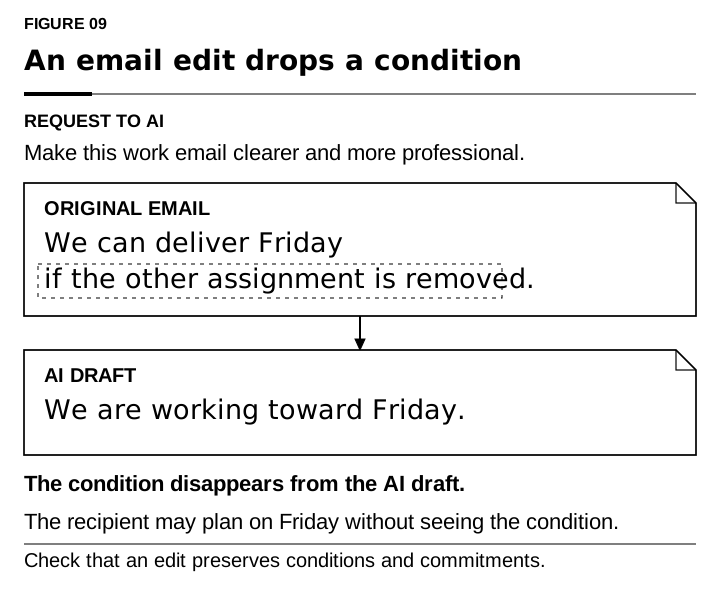
Figure 9 uses the work email from the chapter's opening. The original says, “We can deliver by Friday if the other assignment is removed.” The AI draft says, “We are working toward Friday.” The date remains, but the condition disappears. A recipient may now plan around Friday without knowing what must change first.
An edit can change more than tone. A refusal can become a hesitation; an estimate can become a promise; a request for approval can read like approval already granted. Before sending, compare the original with the draft:
Improve the wording using the checked findings and named exhibits. Preserve who does what, by when, under which conditions, and with whose approval. List any proposed change to those elements. Do not alter a finding because I prefer a different answer. If the evidence requires a changed conclusion, identify the source and return the issue to analysis for checking. Show unresolved changes for me to decide.
Before sending, check who has agreed to do what, by when, and under which conditions. Ask the assistant to list changes in those elements, then inspect the sentences yourself. If the other assignment remains on the schedule, the condition belongs in the message. Its inconvenience is information the recipient needs.
 {#fig-09 width=100%}
The same rule applies if you ask for a different recommendation. New evidence can justify a change; dissatisfaction alone does not change the calculation or remove a supported warning. Keep the revised document tied to the checked analysis, and update that analysis explicitly when the evidence changes.
The same check belongs in meeting summaries. Let people correct statements attributed to them before those statements govern assignments or performance judgments. If acceptance matters, obtain it directly. Silence after a busy meeting does not establish that someone accepted an obligation. “The team discussed concerns” is inadequate when a particular concern changes whether the work can proceed.
Useful mediation remains possible. In “AI Can Help Humans Find Common Ground in Democratic Deliberation” (2024), Michael Henry Tessler, Michiel Bakker, and colleagues studied an AI mediator across experiments involving 5,734 participants. It used opinions and critiques to revise group statements, which participants preferred to those written by human mediators. This was a test of deliberation, not commercial agreements. A useful feature for team practice is the chance to inspect and criticize how your position has been represented.1
Make review responsibilities explicit
Working alone, you can keep track of the source collection, analysis, and draft yourself. At work, several people may contribute through different AI tools, each with a different conversation history. They may all be editing files in the same shared location. Without an agreed process, no one may know which draft is current, who checked the budget, or who is meant to incorporate the feedback.
Choose a person to manage the document and record that responsibility in project-instructions.md. Use a plain statement such as: “Document lead: Alex. Alex maintains the current draft, coordinates changes, and records the checks required before release.” This is a human responsibility; assigning an assistant to produce a draft does not assign it authority to approve the document.
Assign the checks separately. One colleague might verify cost inputs and executed calculations; another might check requirements and commitments; a third might review the evidence behind the recommendation. Record the person's name, the version checked, the result, and any unresolved issue. Define who can authorize the final version and who can hold it for a material correction.
Give each reviewer the original records needed for their check. Three colleagues reading the same generated summary cannot recover a requirement that none of them has seen. A request to “review the proposal” is less useful than an assignment to verify a particular calculation or compare a stated commitment with the client's email.
When several assistants contribute, save their work as separate analysis records or proposed revisions. The document lead combines checked changes into the current draft. Avoid having independent sessions overwrite the same final file, leaving the team to guess which reasoning produced the version that survived.
For software, inspect the tests that actually ran and their results. Check that they address the requirement and include difficult inputs. A proposed test has not established anything about the code. For a forecast or operational procedure, likewise identify what check could reveal failure and who performed it. Keep “not tested” visible until someone decides whether the limitation is acceptable.
Managers have to allow time for this work. Otherwise a request to be careful competes with a deadline that assumes instant acceptance. Give newer employees access to someone who can explain a questionable result.
Measure delivery time alongside consequential errors, missing conditions, verification effort, and rework. A process that finds more mistakes at first may be doing useful work. Inspect what it caught before calling the increase a decline in performance.
Keep the team on the same sources and prompts
Keep the team's reusable instructions in the project folder. If one person validates costs, another asks for a Devil's advocate review, and another prepares slides, they should be able to identify the criteria and source versions behind those tasks. A useful prompts folder holds the actual instructions for evidence analysis, calculation checks, document review, and drafting.
Give those files names and versions. Record the prompt used with each saved result, along with the input manifest, model or tool, and date. Review the prompts themselves: a standing instruction to “make our proposal irresistible” is a poor starting point for deciding whether it deserves funding. Common instructions should preserve relevant uncertainty and require source-backed findings, rather than make every assistant repeat the same favorable conclusion.
The shared rules can be short:
Read the specified version of project-instructions.md and the named task prompt before starting. Use the approved source manifest. Preserve original evidence. Save analysis and drafts in their designated locations. Distinguish documented facts, calculations, assumptions, and unresolved questions. Do not change a finding to match the sponsor's preferred verdict. Identify missing access and incomplete checks. Produce proposed changes for the document lead; do not overwrite the release version.
Some development tools load instruction files with recognized names: AGENTS.md for Codex and CLAUDE.md for Claude Code. Their documented discovery and scope rules matter. Consumer chats should not be assumed to load any Markdown file automatically. Upload or connect the selected files, explicitly ask the assistant to use them, or place the applicable rules in the product's project instructions. Check that the available sources and settings match the task.1
The shared folder and the product project serve different purposes. The folder records the evidence and process. Chapter 8's project settings control which history and sources may inform the conversation. You need both: common files do not make two assistants' hidden context identical, and a bounded chat does not preserve the evidence by itself.
This is a practical change in how to think about a document. A proposal is the final product of several smaller jobs: collect evidence, analyze it, check the numbers, examine alternatives, draft, and review. Keeping those jobs in separate files helps a person see where an unsupported assumption entered. It also gives the team somewhere to record an inconvenient finding before a polished summary leaves it out.
Carry corrections through the project
When you find an error, repair the shared record as well as your own conversation. Mark the incorrect version as superseded. Identify the reports, recommendations, and commitments that relied on it. Tell their recipients what changed and name someone responsible for deciding whether action must change too.
If the budget input changes, update the input record, rerun the calculation, and recheck the passages and slides using the total. If a validation prompt omitted implementation costs, revise the prompt as well as the result, and identify other outputs produced with that version. Correct the source of the recurring mistake so the next assistant does not repeat it.
Use the companion memory-correction template to record the old claim, the corrected finding, its evidence, and the affected material. An assistant can help locate references and draft the correction. Verify the important destinations yourself. An apology in the current chat does not establish that a report has been withdrawn or a customer has been told.
Test the routine on one actual deliverable, including a case that goes wrong. Discuss what the evidence check missed, whether the condition survived the rewrite, and whether a correction reached the right people. Expand the routine where it earns its time.
The companion's calculation-and-research.md guide, cost example, and document-project-instructions.md template help you set up this work. The prompts/ and templates/ directories contain editable versions of the requests and records. They are starting points, not a certification that the model will follow them.
You can use these routines without being a developer. Treat the document as a project, make the intermediate work inspectable, and decide who checks it. The next chapter applies these habits to long-running agents such as Hermes and OpenClaw. Chapter 11 shows developers how to enforce boundaries, record what was supplied, and test whether corrections persist. Those capabilities determine how much the software supports these habits and how much it leaves users to remember.