Chapters 8 and 9 concentrated on consumer tools such as ChatGPT and Claude: inspect the context, supply the evidence, and check the work before relying on it. This chapter moves to agentic systems. These tools can use a model repeatedly, call other tools, keep records, and continue work across sessions. Their operation may extend over days, weeks, or months; the information they carry forward may last for years.
The discussion becomes more technical here. It assumes Hermes Agent or OpenClaw is already installed and configured. Readers interested in getting started can follow the official Hermes documentation or OpenClaw documentation. Installation is outside this chapter. The immediate question is what an installed agent remembers, how that information changes, and how to correct it before it drives more work.
A mistaken recollection can now affect more than a reply. An agent that remembers “the release passed its tests” may use that statement when preparing a status report, planning deployment, or selecting its next tool call. If the statement began as someone's optimistic guess, a good memory system needs to preserve that distinction. Recalling the guess perfectly is not enough.
The benefits are substantial. An agent can remember how a project is organized, which command runs its tests, and what a previous investigation established. You should not have to explain your environment every morning. The task is to keep that useful continuity without letting a mistaken assumption become an operating rule.
An agent has several places to remember
“Clear the memory” is incomplete until you know which store is involved. An agent can retain several kinds of information:
- The current conversation: messages and tool results presently supplied to the model, sometimes with a summary replacing older turns.
- Durable notes: selected preferences, project facts, and lessons that can enter later sessions.
- Stored transcripts: previous conversations, which a search tool may retrieve.
- A search index: a way to locate passages in notes or transcripts. Deleting the index need not change its sources.
- An external memory service: another system that stores, retrieves, summarizes, or interprets information for the agent.
- Reusable instructions and skills: procedures that can preserve an old assumption about how work should be done.
The same claim can appear in several of these stores. Correcting a note does not necessarily correct the transcript that supplied it. Starting a chat can reload the same note. Removing an index can leave its sources ready to be indexed again. A recurring task may use a skill that still contains yesterday's bad instruction.
Begin with a small map of your setup. Name the profile or agent, its workspace, its note files, its transcript store, and any external provider. Identify which processes can write to each. The next sections supply that map for Hermes and OpenClaw. Product directions were checked on October 3, 2026, and rechecked against current documentation on October 27, 2026; compare them with your installed version's help and configuration.
Hermes: inspect what enters the next session
Hermes' built-in durable memory consists of two files. MEMORY.md contains notes about the environment, projects, and lessons learned. USER.md contains the user profile, including preferences and communication habits. On macOS or Linux, the default profile stores them under ~/.hermes/memories/; a named work profile uses ~/.hermes/profiles/work/memories/. They enter a fixed system-prompt snapshot at session start.1
A change can therefore be saved on disk while the running session still has its original snapshot. After a correction, create a new session with /new. On a messaging gateway, restarting the machine or gateway can resume the old session; it does not necessarily create that boundary.1
In these commands, work means an existing profile chosen for review. Replace it with your profile name. Before omitting -p work, confirm that the unqualified command selects the profile you intend. Begin with:
hermes -p work memory status
hermes -p work config get memory --json
hermes -p work journey list
The first identifies providers; the second shows the memory configuration; the third lists learned items with identifiers. To inspect or correct one, use hermes -p work journey edit NODE_ID, replacing NODE_ID with its actual identifier. Read the underlying files too. A chat response saying “I remembered that” does not establish that the entry exists.1
Look for entries whose meaning has grown beyond their source. “User prefers short updates” is a preference. “The project is on schedule” needs a project, date, and supporting record. “The manager is difficult” may be a conclusion from one frustrated exchange. Keep those distinctions instead of treating everything in a memory file as fact.
Approve the memories it proposes
In the intended Hermes chat, turn on the built-in write gate:
/memory approval on
/memory pending
Read a pending entry, then use /memory approve ID or /memory reject ID. Interactive CLI writes can ask inline; messaging, scripts, and background review stage proposals. This gate covers the built-in memory-writing mechanism, including background proposals. It does not govern every filesystem write, transcript, or external provider.1
Approval should answer a specific question. Is this the preference you want remembered? Does the summary preserve what you said? Has the release result actually been checked? Approving readable prose should not silently certify its contents. Keep an inference about you or another person labeled as an inference, with its source.
Hermes' background review can also propose memories and skills after a turn. display.memory_notifications: verbose makes gateway notifications more informative. Turning notifications off only hides the notice. To pause automatic post-turn review, use:
hermes -p work config set \
  auxiliary.background_review.enabled false
Manual /refine is separate. Record the previous setting so you can restore it, reload the affected runtime, and let work already in flight finish. Inspect skills as well as notes: an obsolete lesson can survive as a procedure. Skill writes have their own /skills approval on gate; memory approval does not cover them.1
Compression and curation are different jobs
Hermes automatically shortens an overgrown conversation when configured context-pressure thresholds are reached. /compress requests that work manually. Current default compaction keeps the same session ID and retains older turns for search. It changes what the model receives next, rather than erasing the conversation.1
The durable note files follow a different process. Their configurable defaults allow 2,200 characters for MEMORY.md and 1,375 for USER.md. A write that exceeds its limit returns an error; the tool does not silently shrink the file. The agent can merge or remove entries and retry.1
Those edits deserve attention. Suppose a note says, “On October 3, the user suspected the contractor would miss Friday's deadline; no updated schedule had been inspected.” Replacing it with “The contractor misses deadlines” saves space by losing the date, attribution, and uncertainty. The replacement is more convenient and less trustworthy.
Ask for a proposed merge before accepting it:
Shorten these entries while preserving their sources, dates, scope, and uncertainty. Keep my preferences separate from claims about other people. Do not turn something I reported into something independently checked. Show the old and proposed entries and identify any detail that would be lost.
Compare the proposal with the originals. A character budget is a reason to choose what belongs in durable notes; it is not a reason to remove a qualification that changes the meaning. Keep the larger source record in the project described in Chapter 9, with a short memory reference when appropriate.
Past chats remain another source
Hermes saves conversations in the active profile's state.db. Its session_search tool can retrieve past messages. Removing a mistaken entry from USER.md does not remove the exchange that produced it. /compress reduces active context, and /new starts a session; neither deletes transcripts.1
For a fresh assessment, decide which routes should be available. Turning both memory.memory_enabled and memory.user_profile_enabled to false disables the built-in stores. An external provider has a separate control. Past-chat search is separate again: add session_search to agent.disabled_toolsets, preserving existing restrictions. These choices do not stop ordinary recording or prevent other permitted tools from reading files. Appendix C gives the extended inspection, pause, export, and selected-deletion procedure.
Give a second agent its own profile rather than pointing two processes at one Hermes home. Profiles separate the normal configuration, notes, and session database. They do not create an operating-system access boundary, and an external service can reconnect their data. Check the provider's user or workspace identifiers as carefully as the local folders.1
OpenClaw: inspect sources as well as the index
OpenClaw's default memory-core arrangement uses workspace files. USER.md holds preferences, MEMORY.md holds curated durable information, and memory/YYYY-MM-DD.md or related dated files hold working notes. DREAMS.md is a consolidation diary. An installed memory plugin can change the arrangement, so identify it before following default instructions.1
A fresh /new or /reset session is not blank memory. Bootstrap files and recent daily notes can still enter it. Compaction can summarize older conversation turns while the original transcript remains on disk. Before compaction, an automatic memory flush can also give the agent an opportunity to save important context. Saving, shortening, and retrieving are different operations.1
For the default memory-core plugin and an agent named main, begin with:
openclaw memory status --agent main --json
openclaw memory search \
  --agent main --query "release" --json
Replace the name and topic. Follow results to the source files and dates. Investigate a stale index before assuming an absent match means information was never saved. Search can use a configured external service; these commands should not be assumed to run entirely offline.1
Review what dreaming promotes
OpenClaw calls its default background consolidation dreaming. It can stage and reflect on candidates, then promote selected material into MEMORY.md. This is software managing records, not evidence of an agent having human experiences.1
Begin in chat with /dreaming status. To pause automatic dreaming during review, an authorized owner can use /dreaming off. Inspect DREAMS.md for the process history and MEMORY.md for the durable result. The diary is not itself a source for further promotion.
The command openclaw memory promote --agent main --json previews promotion; adding --apply makes changes. Review the preview first. Ask what each candidate came from, whether repeated references are independent sources, and which qualifications would disappear.
Consider the contractor example. A daily note preserves your concern and the missing schedule. Several later discussions repeat it. Consolidation should not mistake those repetitions for independent confirmations that the contractor is unreliable. A useful correction says what the updated schedule establishes, rather than simply recording that you feel better today.
Correct a source before rebuilding its index
Compare a bad conclusion in MEMORY.md or a daily note with its source. Correct the old note or mark it superseded, preserving the relevant date and explanation. For the intended memory-core store, refresh and inspect retrieval:
openclaw memory index --agent main --force
openclaw memory search \
  --agent main --query "release" --json
The order matters. Resetting an index while keeping an incorrect source can let indexing recreate the problem. openclaw memory reset --agent main clears the derived core index and its embedding cache, preserving notes and transcripts. It is not a general erasure. Omitting the agent selection can affect all configured agents.2
OpenClaw also has memory forget for tracked material derived from a particular session. It offers a --dry-run preview; applying it has immediate effects. It does not remove original transcripts or every handwritten or externally stored copy. Appendix C explains the selection and limits.
Memory search, pre-compaction saving, dreaming, and the memory plugin slot have separate controls. An embedding provider chooses how search represents text; it is not the same as a service that stores or interprets memories. In current OpenClaw configuration, a search provider named none means keyword-only search, not memory disabled. Appendix C gives precise pause settings rather than treating one switch as a universal fresh start.1
Mem0 and other memory services
An external subsystem can hold more information than a short note file, retrieve relevant material, and prepare context for an agent. It can also perform its own extraction or interpretation. That adds another place where a user's statement can become a durable conclusion.
Mem0: extracted memories need inspection
Mem0, pronounced “mem-zero,” provides a memory layer with hosted and self-managed options. Applications supply inputs, associate them with an identity or scope, and retrieve memories for later requests. Extraction can save selected information instead of every message verbatim. A directly stored entry and a model-extracted entry have different origins.1
This is useful when a transcript is much larger than the next request should contain. It also means the extracted memory needs review. “The user said this contractor is unreliable” and “The contractor is unreliable” should not become interchangeable because an extraction step shortened the text.
Hermes documents Mem0 search, add, update, and delete tools. Mem0 publishes a separate OpenClaw integration. Selecting either does not erase built-in notes, old transcripts, or another store. Check the adapter actually running, not merely the service's name.1
One implementation detail makes that concrete. In the Hermes Mem0 adapter examined for this chapter, automatic extraction can use both user and assistant text; explicit addition uses a different path. Normal recall filters by user_id and can span agents under that identity. Different agent_id values alone are not isolation. The built-in Hermes approval gate does not control all this provider's extraction.1
For an existing integration, identify its real scope identifiers. Inspect relevant entries and original inputs. Correct a specific entry through the supported update path, then query again in a fresh task. Check whether a summary or older copy still returns. Automatic extraction does not establish automatic contradiction repair.
Honcho and Hindsight: interpretation is another layer
Honcho organizes conversation information around participants and can supply representations or reasoning about them. It documents Hermes and OpenClaw integrations. A remembered preference and an inferred trait remain different claims, even if both help predict what a user will want.1
Hindsight distinguishes retaining information, recalling it, and reflecting over it, using memory banks to organize records. It also documents Hermes and OpenClaw integrations. Reflection can synthesize several records into an answer; that synthesis is not another independent source. Check the bank's scope and the evidence supporting a reflected conclusion.1
For either service, find out where raw inputs and derived representations live, which processing is remote, and how to export, correct, delete, and verify a change. A locally stored database can still use a remote language model or embedding service. Conversely, a hosted integration may keep a separate local copy. Deployment and data flow need inspection, not assumptions based on a product label.
Other arrangements are not interchangeable
OpenClaw also documents a LanceDB memory plugin with its own capture, recall, and row-level tools. Its Memory Wiki is a companion knowledge layer with source records and compiled output; it does not replace the memory slot. These introduce further records to inspect when a conclusion is corrected.1
Letta is a stateful agent platform rather than a universal drop-in Hermes or OpenClaw provider. Its current Agent SDK uses a versioned memory filesystem; older SDK memory blocks belong to a different documented interface. The relevant question is what your installed arrangement actually saves, retrieves, shares, and revises.1
The companion's memory-services guide and Appendix C provide more detail. Begin with the system you already use. Establish what it stored, who could write it, what the next request retrieved, and whether a correction reached that request.
Give a long-lived agent a maintenance routine
A weekly review should be more specific than “clean up my memory.” Choose one profile or agent and one purpose, then work through its stores:
1. Identify the writers. Include foreground turns, background review or dreaming, recurring work, and plugins. Pause the relevant automatic writer during repair and let work already in flight finish. 2. Inspect recent changes. Read rewritten notes and skills. Look for missing dates, unverified conclusions, and preferences that became general rules. 3. Check important entries against sources. Use the test log, agreement, schedule, or message. A user's report is not a checked result. 4. Correct dependent material. The source may have supplied a note, summary, skill, and recommendation. Updating only the first can leave the others in use. 5. Test a new session. Ask a neutral question and inspect the retrieved context. Verify the correction is used and the old conclusion does not return through another route. 6. Resume deliberately. Restore the settings you changed, record your checks, and keep unresolved questions visible.
This is a suggested habit, not a scientifically established interval. A major change in a project or responsibility may justify an immediate review. Memory useful for drafting a status email should not silently become authority to deploy software or spend money. Keep permissions and release requirements in the system governing the action.
Ask the agent to prepare a review:
Inventory the memory stores and instructions you can inspect for this project. List recent additions and changed conclusions, with sources and dates. Separate reports, preferences, checked evidence, and interpretations. Identify conflicts and propose edits before changing anything. Say which stores and background processes you cannot inspect.
Compare that inventory with the configuration and files you control. A second model can help inspect a summary, but it can repeat the error if it receives only the first model's summary.
Saving a conclusion changes the next task
Xutao Mao and colleagues' preprint, “Agents Don't Just Agree, They Remember: Benchmarking Persistent Sycophancy in Stateful Personal Agents,” tests this problem with Hermes and OpenClaw. It separates a conversation that can write durable state from a later query with that conversation cleared. It examines whether a user's claim survives in profiles, notes, or skills and returns with greater authority or wider scope. Lost attribution and upgraded claims are important failure patterns. These controlled tests support inspecting agent writes; they do not establish what every installed agent will do over years of use.1
Two other benchmarks supply useful questions. LongMemEval: Benchmarking Chat Assistants on Long-Term Interactive Memory includes updates and abstention: can the assistant use a correction, and can it decline to answer when the record is insufficient? MemSyco-Bench: Benchmarking Sycophancy in Agent Memory tests when memory should influence decisions, including conflicts, scope, updates, and useful personalization.11
Use those questions in an isolated test profile with synthetic records. Keep evidence fixed and vary the user's desired answer in separate contexts. Add an incorrect test memory, supply a correction, start another session, and inspect the result. Check the saved state and full reply, including omitted warnings. A test that looks only for a polite tone misses the problem.
Try the mechanics with local Python
The companion includes two examples for readers who want to see these mechanisms without connecting a model or changing an installed agent. They use Python's standard library, synthetic records, and temporary local state. They make no network calls and need no API key. Read them or ask an assistant to execute them in an appropriate environment.
See what a shorter summary can lose
From the companion resource directory, run:
python3 developer/compaction_demo.pyThe example compares an intentionally bad summary with a source-aware version. It checks whether the summary retains the speaker, source, scope, and uncertainty. Both can be shorter than the original; only one preserves the distinctions needed for the next assessment. No model generated these summaries, so this demonstrates checks rather than measuring a product's summarization quality.
For a real summary, inspect the original evidence. A script checking whether a source identifier survived cannot establish that the source supports the claim. Shortness is easy to measure; fidelity takes more work.
Make a correction survive a restart
Run the second example:
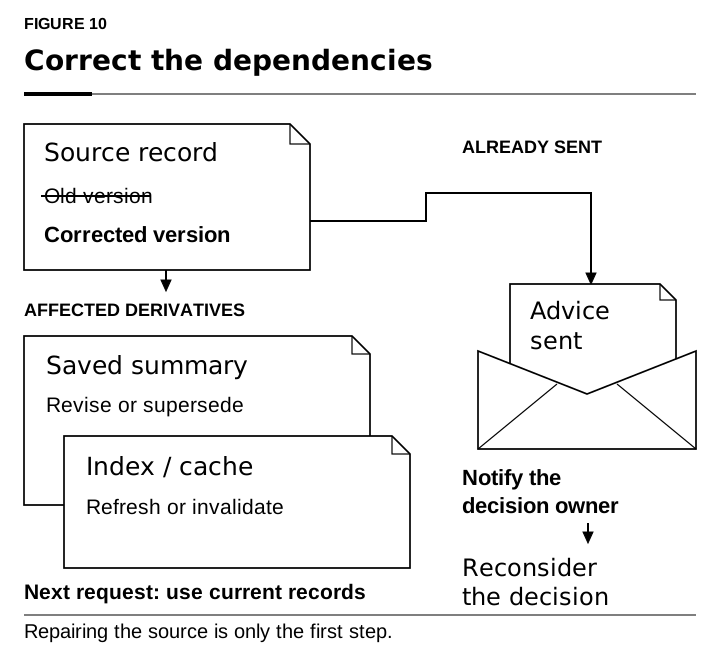
python3 developer/durable_memory.pyIt creates a temporary SQLite store and uses separate Python processes to demonstrate persistence. An unverified release report supplies a summary and recommendation. A checked test result then contradicts the report. The correction marks the old report superseded and its derivatives as needing review. Retrieval after a restart excludes those records while preserving useful information in another scope.
The earlier developer/context_store.py example shows the same dependency idea in memory. A record preserves the distinction between a report and evidence:
Memory(
    id="m1",
    text="Release tests passed",
    kind="report",
    source="message:118",
    owner="alice",
    domain="release",
    check="test output not inspected",
)
Those fields describe a record; they do not make it true. The application must control identity, scope, and verification status. A deployed service also needs appropriate transactions, access controls, retention, and a way to review decisions already made from bad records. These examples teach the mechanics rather than supplying that whole service.
 {#fig-10 width=100%}
The companion's evaluation examples and skills let you compare responses under fixed evidence, propose memory corrections, and inspect supplied context. They do not reveal hidden provider inputs or guarantee independent judgment. Record actual checks rather than a model's assurance that everything looks good.1
A long-lived agent needs memories you can challenge, corrections that reach later tasks, and requirements that remembered enthusiasm cannot override. Those are practical controls for using powerful tools well. The final chapter shows developers how to build those controls into API applications, select context explicitly, and validate an answer before storing it or acting on it.